Scene Import for OBS Studio
A downloadable tool
Bring selected scenes from one OBS collection into another, with separate imported sources and a preview of name changes. Reuse scenes from a previous show without linking them to same-name sources in your current collection.
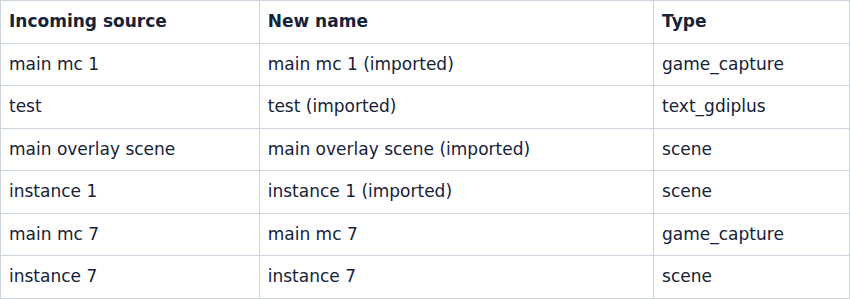
Choose two exported collection JSON files, select the scenes you want, and download a new collection. When a source name is already in use, the import gets a new name. Imported sources get distinct identifiers, so they do not reuse the destination's existing source objects. Shared sources within your import stay shared.
What you get
- A local browser tool: extract the ZIP and open
index.htmlin a recent Chromium browser. No plugin installation or Node required. - A preview of imported source names and referenced file/font paths.
- A new collection JSON and a downloadable change report. Your input files stay unchanged.
- Source code and an MIT licence, including commercial use.
Use it to prepare a separate collection on the same machine. Media files and fonts are not copied. Paths and window/device selections stay unchanged, and separate source objects still use the same external files and physical devices.
Supported imports
One main canvas, scenes and groups, unfiltered stock colour, image, text and local media sources. Stock Windows capture, DirectShow and WASAPI settings can be transformed, but Windows/macOS operation and hardware capture have not been tested. Windows sources need Windows.
Selected scenes with unsupported dependencies are refused: imported filters, scripts, browser/plugin sources, custom item transitions, network media paths and additional canvases. Unsupported scenes elsewhere in the incoming collection do not prevent importing a supported selection.
The destination keeps its existing sources, global audio and collection settings. Incoming collection-wide settings, transitions and module state are not merged. Incoming global audio is only included if a selected scene references it, as a separate scene source.
Before you use the result
Export trusted collections from OBS using Scene Collection > Export. Open the tool, load both exports, choose scenes, enter a new collection name, and click Preview import. Download the collection and report, then use Scene Collection > Import in OBS.
Check the new collection's media, audio mix, layout and shortcuts before a show. Retained destination plugins, scripts, browser URLs and automation can run when OBS loads it. This tool does not validate that existing content. Imported hotkeys can conflict with existing shortcuts. Different canvas resolutions can change the layout. It does not connect to OBS or control a live broadcast.
Source Copy is a free OBS plugin for copying scenes and sources, and manual renaming is another option. This tool offers a local file workflow with an import preview; it covers fewer incoming source types and does not package media for another computer.
Made by Madrasco. AI coding agents wrote the code and documentation.
Questions or problems: comment below or email support@madrasco.dev.
An independent tool for OBS Studio, not affiliated with or endorsed by the OBS Project.
Purchase
In order to download this tool you must purchase it at or above the minimum price of $5 USD. You will get access to the following files:
Leave a comment
Log in with itch.io to leave a comment.