VN Slim: shrink a Ren'Py game's images and audio
A downloadable tool for Windows and Linux
VN Slim is a command-line tool for Ren'Py developers. Point it at your project folder and it writes a converted copy to a new folder: PNG and JPG images become WebP (or AVIF), WAV and FLAC audio becomes Opus (or Ogg Vorbis), and every place in your scripts that names one of those files is changed to the new name. Then it checks the copy and writes a report. Your project folder is not changed.
Status: candidate release 0.1.1 fixes file-name preservation and lint reporting defects found in 0.1.0. Its Linux build was used in an independent audience review on the Ren'Py SDK tutorial. The results below are historical 0.1.0 runs, not a repeat of that test set on 0.1.1. The Windows build was tested under Wine, a Windows-compatible layer on Linux, not yet on a physical Windows PC. The Windows files are unsigned, so Windows SmartScreen will warn when you run them. Choose More info > Run anyway to continue.
Historical results on real games (0.1.0)
VN Slim 0.1.0, Linux build, default settings, Ren'Py 8.5.3 SDK, on open-source games from GitHub:
- The Royal Messenger (short visual novel, MIT): 40.3 MB → 8.3 MB (79% smaller). No new lint messages; every converted image decoded.
- yet-another-phone-for-renpy (phone-chat interface, MIT): 26.3 MB → 17.4 MB (34% smaller). Most of what's left is art source files that VN Slim doesn't touch.
- SpaceNET (sci-fi adventure, GPL-3.0): 30.1 MB → 23.7 MB (21% smaller). 128 images stayed PNG because its scripts build their names from pieces. It doesn't load in Ren'Py 8.5.3, so it got the reference check only.
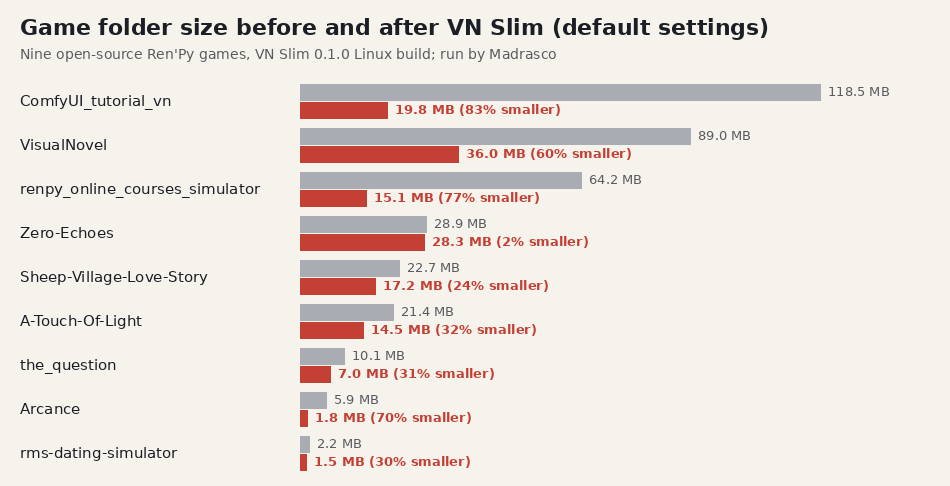
On nine other open-source games (including The Question, Ren'Py's sample game), run by us and not covered by the separate check below, the game folders came out 2% to 83% smaller, median 32%; the 2% game is mostly a 22 MB font. Large PNG backgrounds and WAV music shrink most; fonts, videos and MP3 or Ogg audio don't shrink.
On Linux, a separate checking script, written by an AI agent that didn't build VN Slim, re-scored the first three games' images (all 349 it could score were at least 0.98), ran Ren'Py's lint on the two that load (no new messages) and confirmed each original folder was byte-for-byte unchanged.
The 0.1.0 Windows build's self-test passed under Wine 11.18 on Linux. We also ran 0.1.0 under Wine on four real games: The Question, The Royal Messenger, VisualNovel/BytesOfLove and ComfyUI_tutorial_vn. Their output sizes and check results matched the Linux runs. These were our tests, separate from the Linux checking script above; they do not establish how the build behaves on a physical Windows PC.
What it does
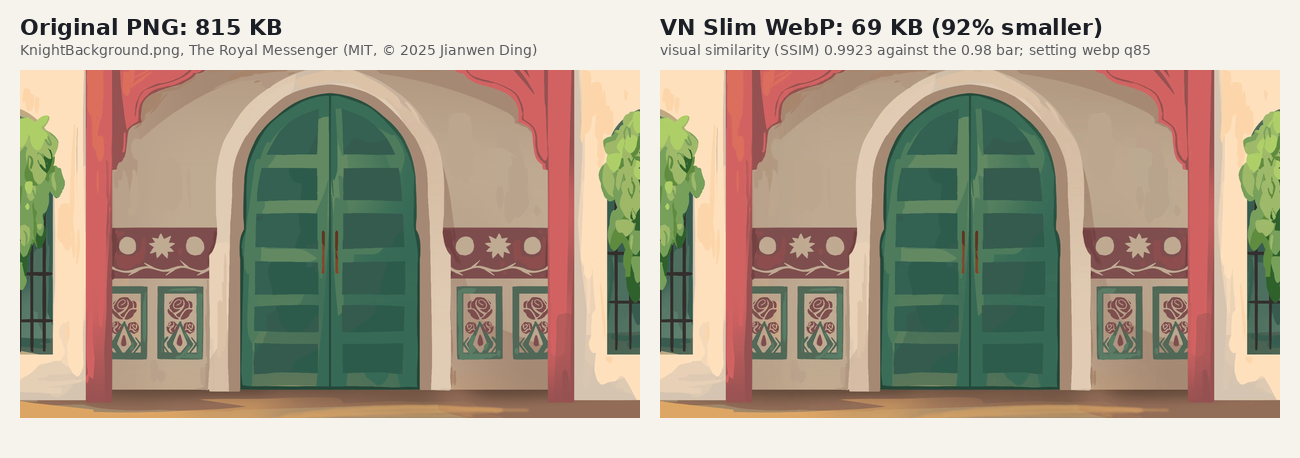
- Images: keeps the smallest WebP that scores at least 0.98 on SSIM, a standard visual-similarity score (1.0 = identical). If no version is smaller, the original stays.
- Audio: WAV and FLAC become Opus (or Ogg Vorbis) when the result is smaller. Each converted file is decoded again and must have the same length and number of channels.
- Scripts: updates the references in
.rpy,.rpymand.pyfiles (including_ren.py) (image statements,Image()andFrame(), gui variables,{image=}text tags,playandqueue, and tl/ translations), matching names the way Ren'Py does. - Leaves alone, and says why in the report: files Ren'Py opens by a fixed name (gui/button/*, the window icon, the presplash), files whose names a script builds from pieces, images or sounds outside images/ and audio/ that no script names, and files that dialogue or other text mentions by name (VN Slim never changes the text your players read).
- Checks: every file name in your scripts is looked up again in the converted copy. With your Ren'Py SDK, Ren'Py's own lint runs before and after on a throwaway copy, and Ren'Py decodes every converted image and looks up every converted sound.
What the report looks like
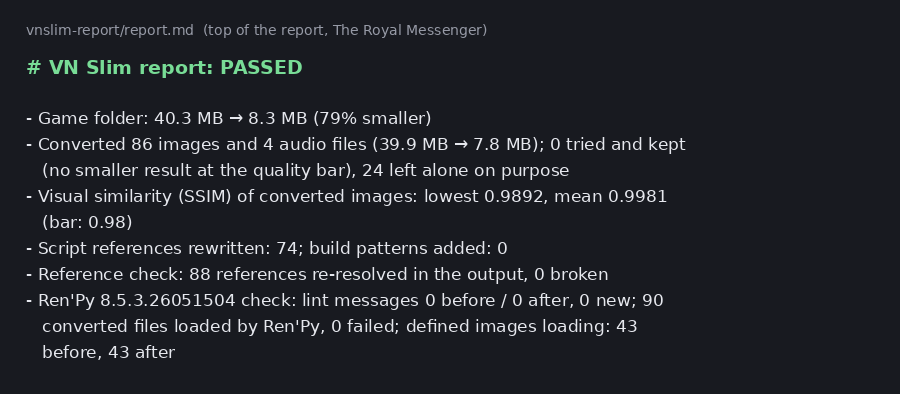
The converted copy has a vnslim-report folder. This is the top of the historical 0.1.0 report.md for The Royal Messenger (abridged: the heading above it says PASSED, arrows are written as ->, the time line is left out and line breaks are added to fit this page):
- Game folder: 40.3 MB -> 8.3 MB (79% smaller)
- Converted 86 images and 4 audio files
  (39.9 MB -> 7.8 MB); 0 tried and kept (no smaller
  result at the quality bar), 24 left alone on purpose
- Visual similarity (SSIM) of converted images:
  lowest 0.9892, mean 0.9981 (bar: 0.98)
- Script references rewritten: 74;
  build patterns added: 0
- Reference check: 88 references re-resolved in the
  output, 0 broken
- Ren'Py 8.5.3.26051504 check: lint messages
  0 before / 0 after, 0 new; 90 converted files
  loaded by Ren'Py, 0 failed; defined images
  loading: 43 before, 43 after
Below that: a grouped summary of deliberately preserved files and why, names in your scripts that don't match any file, and the largest files. Long groups show only some names in Markdown. files.csv has one row per converted, considered or deliberately preserved media file; it is not an inventory of every project file. report.json contains the detailed check results and full preserved-file groups.
How to run it
Step 1. Unzip the download for your system (Windows or Linux). You get a vnslim folder with the program, README.txt and the licences.
Step 2 (Windows, optional). Run selftest.bat to try the program on a tiny made-up project and see that it works on your PC.
Step 3. Run it on your project folder (the one with game/ in it) and give it a new folder for the copy, outside your project. Adding your Ren'Py SDK path is optional and turns on the Ren'Py checks.
On Linux:
./vnslim/vnslim ~/MyGame ~/MyGame-slim \
  --renpy ~/renpy-sdk
On Windows (Command Prompt or PowerShell, inside the extracted vnslim folder containing vnslim.bat; put it all on one line):
.\vnslim.bat "C:\MyGame" "C:\MyGame-slim" --renpy "C:\renpy-sdk"
Or, on Windows, drag your project folder onto this file in the unzipped folder (not yet tested, see Limits). It writes the copy next to your project, without the Ren'Py check:
vnslim-drop-a-folder-here.bat
Step 4. Read vnslim-report/report.md in the new folder, play the converted copy, and build your distributions from it.
Options
--images webp|avif|none  image format (default webp)
--audio opus|ogg|none    audio format (default opus)
--min-ssim 0.98          similarity bar (default 0.98)
--audio-quality 0.6      0-1, higher: better and larger
                         (default 0.6)
--reencode-lossy-audio   also convert MP3 and Ogg files
--jobs N                 parallel workers
In 0.1.1, exit code 0 means no confirmed conversion problems were found, 2 means checks found problems, and 1 means the run could not complete (for example a wrong path). A Ren'Py check that couldn't run is stated in the report, not counted as a problem. If repeated lint runs on the unchanged original disagree, the lint comparison is INCONCLUSIVE and can still exit 0: this does not establish clean or unchanged lint. Read lint-before.txt, lint-original-repeat.txt and lint-after.txt in the report folder, run lint yourself and play the copy before release. The report's first line states which checks passed and whether lint was inconclusive.
AVIF needs Ren'Py 8.1 or 7.6 or newer and is slower to make; in the historical 0.1.0 run on yet-another-phone-for-renpy it gave 17.2 MB instead of 17.4 MB.
Requirements
64-bit Windows 10 or 11, or 64-bit Linux with glibc 2.27 or newer. Each download includes its own Python runtime and image and audio libraries; nothing to install. A Ren'Py SDK is optional; tested with Ren'Py 8.5.3 only.
Limits
- Windows: tested under Wine 11.18, a Windows-compatible layer on Linux, only. The historical 0.1.0 self-test passed and four real games gave the same output sizes and check results as the Linux build. It has not yet been tested on a physical Windows PC, and the drag-a-folder file has not been run at all, even under Wine. The files are unsigned, so Windows SmartScreen will warn. Choose More info > Run anyway to continue. If it fails on yours, tell us in the comments.
- Platforms: no macOS version. Linux needs glibc 2.27 or newer and was tested on Ubuntu 24.04.
- Not a play-through. Play the converted copy before you release it. It has not been tried on web or Android builds.
- What it can't see: if a
.rpy,.rpymor.pyscript joins a name to a bare".png"(as in"portraits/" + name + ".png"), every PNG in the game stays PNG. An image or sound named only in a data file your code reads (JSON, CSV, text) is still converted, and that name isn't updated. Files inside .rpa archives are not converted, so run it before you build distributions. - Not identical: converted images are close to the originals. Zoomed in, lossy WebP slightly softens sharp edges between strong colours (seen by an AI agent on 40×40 emoji and one larger cover image). Raise the similarity bar for a stricter result. MP3 and Ogg audio stay as they are unless you ask, because re-encoding lossy audio loses quality twice.
- The Ren'Py check needs a game that loads in the SDK you point it at; otherwise you get the reference check only, and the report says so.
- New tool: no reviews yet, and nobody outside Madrasco has used it.
Credits
Cover and screenshot pictures are the game art of The Royal Messenger by Jianwen Ding (MIT licence, © 2025, github.com/Jianwen-Ding/Husky-jam-vsnovel; permission notice: https://github.com/Jianwen-Ding/Husky-jam-vsnovel/blob/f8399b751dcf8a5b21b84ae90ab3cf45e189e523/LICENSE), shown before and after VN Slim's conversion. The other games named above are credited in the download's report examples by their repositories; none of their files are included.
Licence
Use it on your own and your team's projects, personal and commercial, and ship games you processed with it without any notice or fee. Don't redistribute or resell the tool itself. The open-source parts it bundles keep their own licences (THIRD-PARTY.txt). Five of them are under the LGPL: libsndfile, libsoxr and LAME (their source is the third download on this page), and mpg123 and libquadmath (write to support@madrasco.dev and we will send the source, for at least three years). The library files can be replaced with your own builds. Full text in LICENSE.txt inside the download.
Made by Madrasco. AI coding agents wrote VN Slim's code, its tests and this page.
Questions or problems: comment below or email support@madrasco.dev. Not happy with it? Request a full refund within 30 days of purchase.
Purchase
In order to download this tool you must purchase it at or above the minimum price of $8 USD. You will get access to the following files:
Leave a comment
Log in with itch.io to leave a comment.